
Name-Based Case Searches
No free anonymous name-search page combines every Jefferson Davis County court. So match the subject to the court first. Fifteenth Circuit MEC handles Circuit Court and related County Court electronic cases. Thirteenth Chancery MEC covers chancery subjects. Justice Court and city courts each require their own clerk route. Relying on a name-only search skips that step, and it can mislead. Lower-court, municipal, restricted, and older paper matters exist. They may simply never reach the electronic channel you are searching.
- Identify the issuing or receiving court from the notice, citation, case papers, or the subject of the matter.
- Open the applicable MEC Court Information page and determine whether the case belongs in the Circuit or Chancery district system.
- Use PAMEC after registering if remote access is appropriate, then record the actual name or style field displayed in the lawful session.
- If the online route does not expose the record, call or visit the clerk who holds that court’s docket and provide the court, the known name or style, and any date range.
Justice Court posts no public online case form. For traffic, DUI, county ordinance, limited-civil, or initial felony matters, contact the responsible clerk directly. That beats repeating an MEC name search.
Jefferson Davis County MEC Case Search Gate
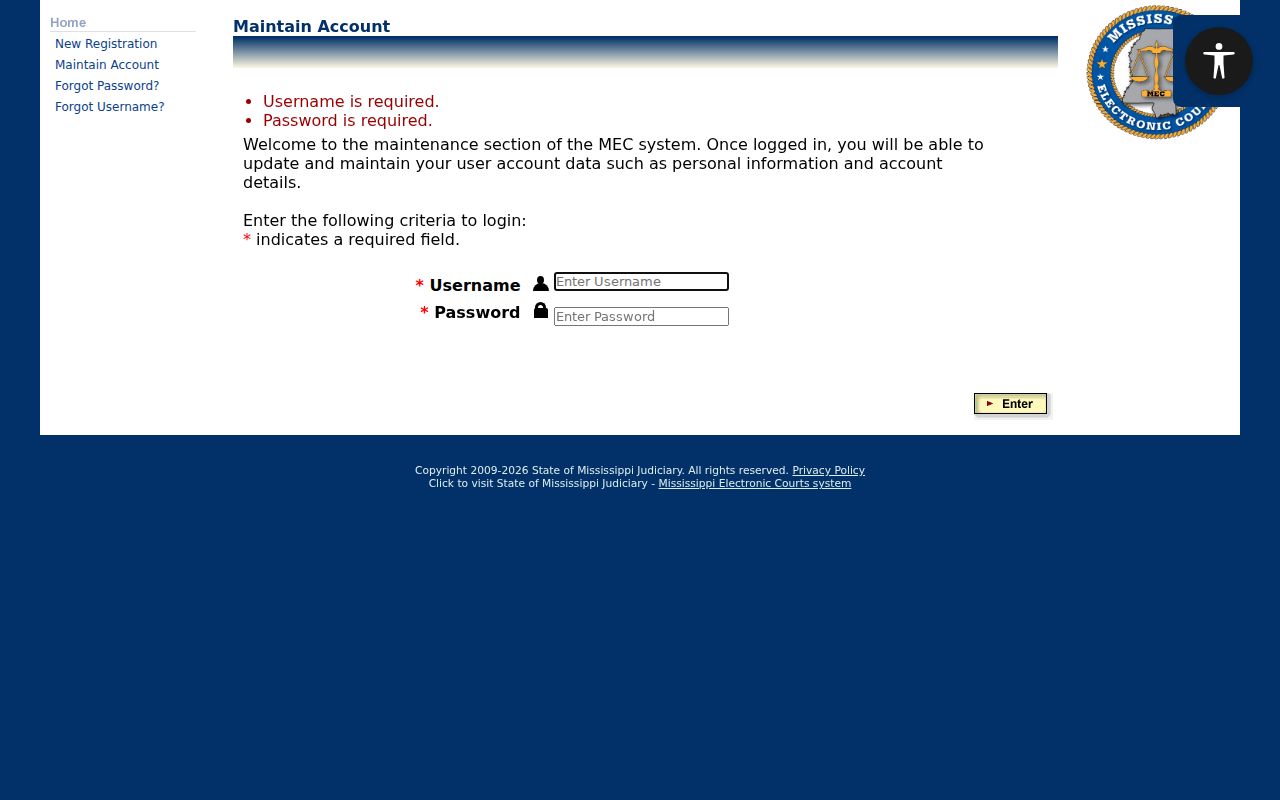
The Fifteenth Circuit MEC route supplies free Court Information. Its query page, though, opens an account gate rather than a public search form. The screen shows Login, Password, and a client code. Credential-recovery links, PAMEC registration, and permission notices appear as well. No anonymous last-name, case-number, court, or date selector appears there. Those fields cannot be assumed before a lawful session.
| Visible control | Type | Required | What it establishes |
|---|---|---|---|
| Login | Text input | Yes | MEC filer or PAMEC account identifier. |
| Password | Password input | Yes | Account credential rather than a case-search field. |
| Client code | Text input | Shown on the legacy frame | No public option list is displayed. |
| PAMEC registration | Link | No | Routes to the remote public-access registration process. |
The official PAMEC registration page lists the user types available before an account is created.
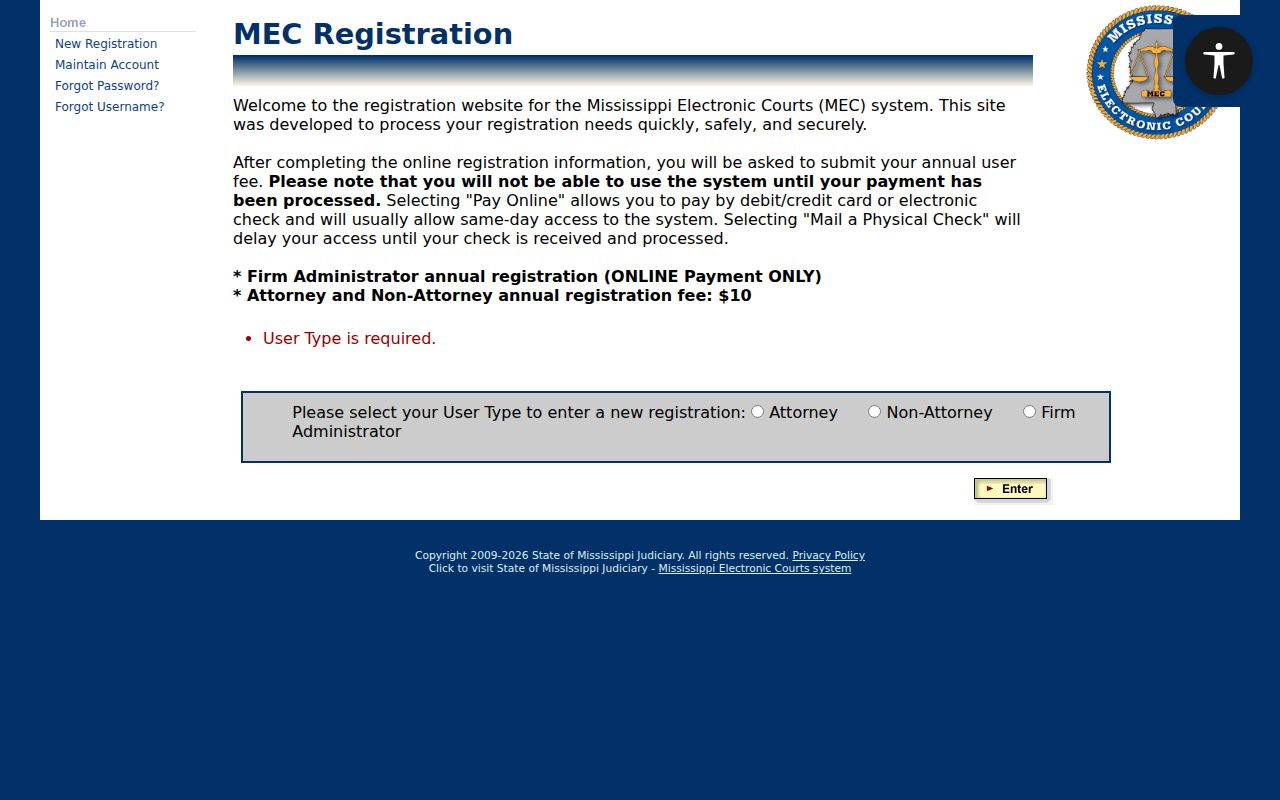
Choosing a registration type is an access step, not a result page for a Jefferson Davis County case. The official PAMEC personal-information screen documents the account fields required before a remote session.
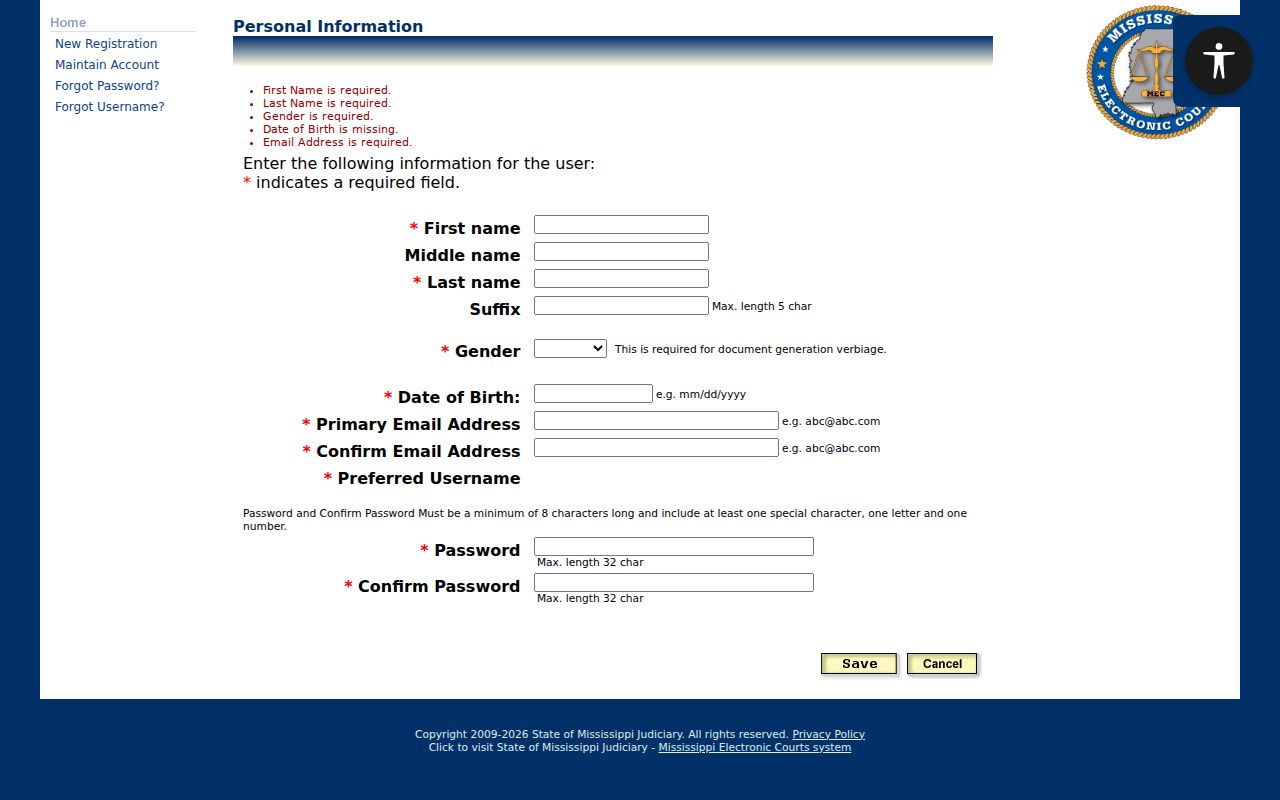
These fields build a PAMEC account. They do not reveal the case-query controls that may appear only after authentication.
Jefferson Davis County Case Search Fields
Before login, the Jefferson Davis County MEC pages show account controls. The real case-query fields are not there. After a lawful session or at a clerk terminal, note exactly what the court displays: the party or style label, case-number format, court and case-type selectors, filing-date fields, status options, result columns, and error messages. That record guards against a false match or a false no-result. It also prevents assuming the Circuit and Chancery interfaces are identical. The public pages never establish that.
Case Number Searches
A court name paired with a case number makes the most direct search request you can make. The public MEC screens for Jefferson Davis County publish no anonymous local case-number format. Guessing a pattern would be wrong. Copy the number exactly as it appears on a court notice or prior docket. Pair it with the correct court. After authorized MEC access, or at a clerk terminal, the Case Number label is the field to verify. One caution deserves emphasis here. A number from a Justice Court initial proceeding, a Prentiss municipal matter, or a later Circuit Court case may mark different stages of the same matter. Ask the receiving clerk about a bound-over, appeal, related, or legacy reference. Never change digits to fit a guessed format.
Jefferson Davis County PAMEC Case Search Billing
PAMEC is Mississippi's remote public-access layer for participating MEC courts, not a free statewide index. The official non-attorney terms list a $10 annual registration fee. They also charge $0.20 for each returned page. That applies even when a search returns no matches and the page is empty. Paying online by card or eCheck is usually the fastest registration route. A paper check can slow access down. The official non-attorney PAMEC terms describe access. They cover docket sheets and electronic documents in non-restricted cases.
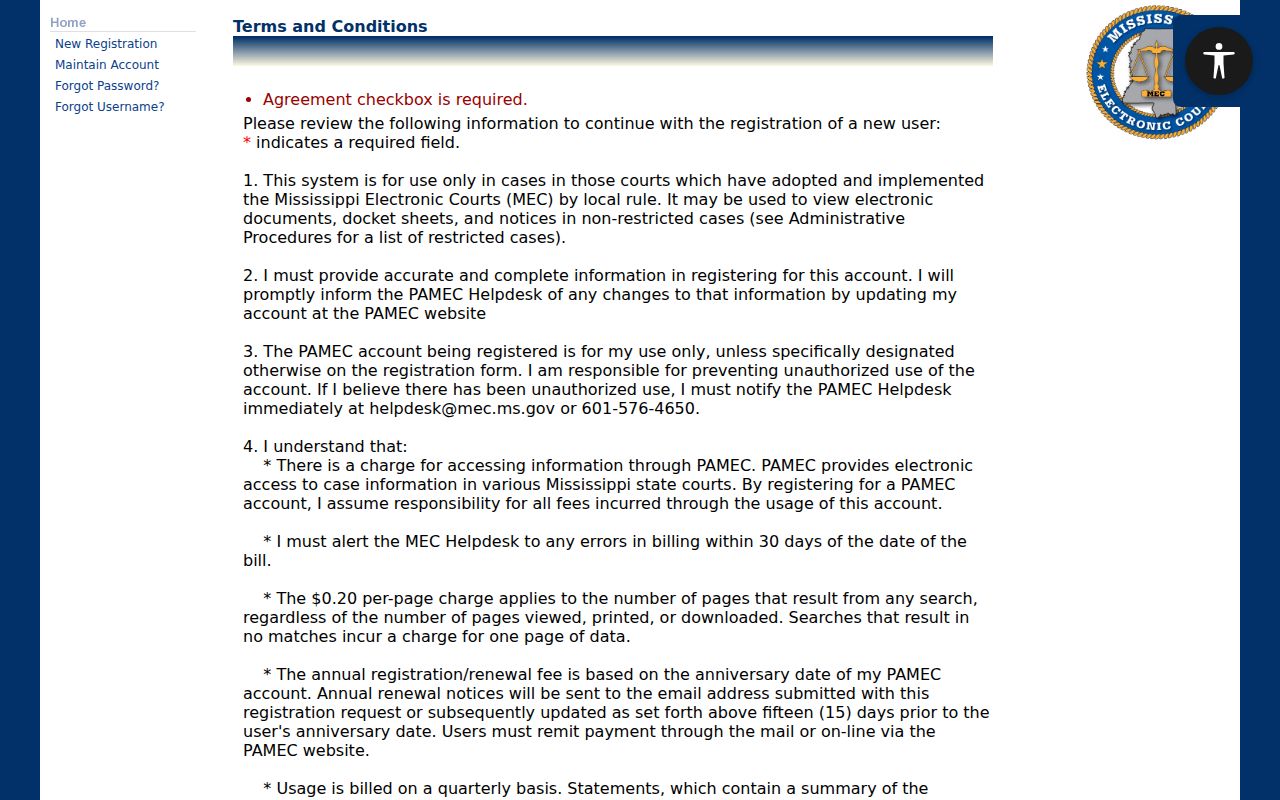
The terms separate paid remote retrieval from free electronic inspection, which clerk offices provide during regular business hours. The official PAMEC payment page shows the payment choices used during registration.
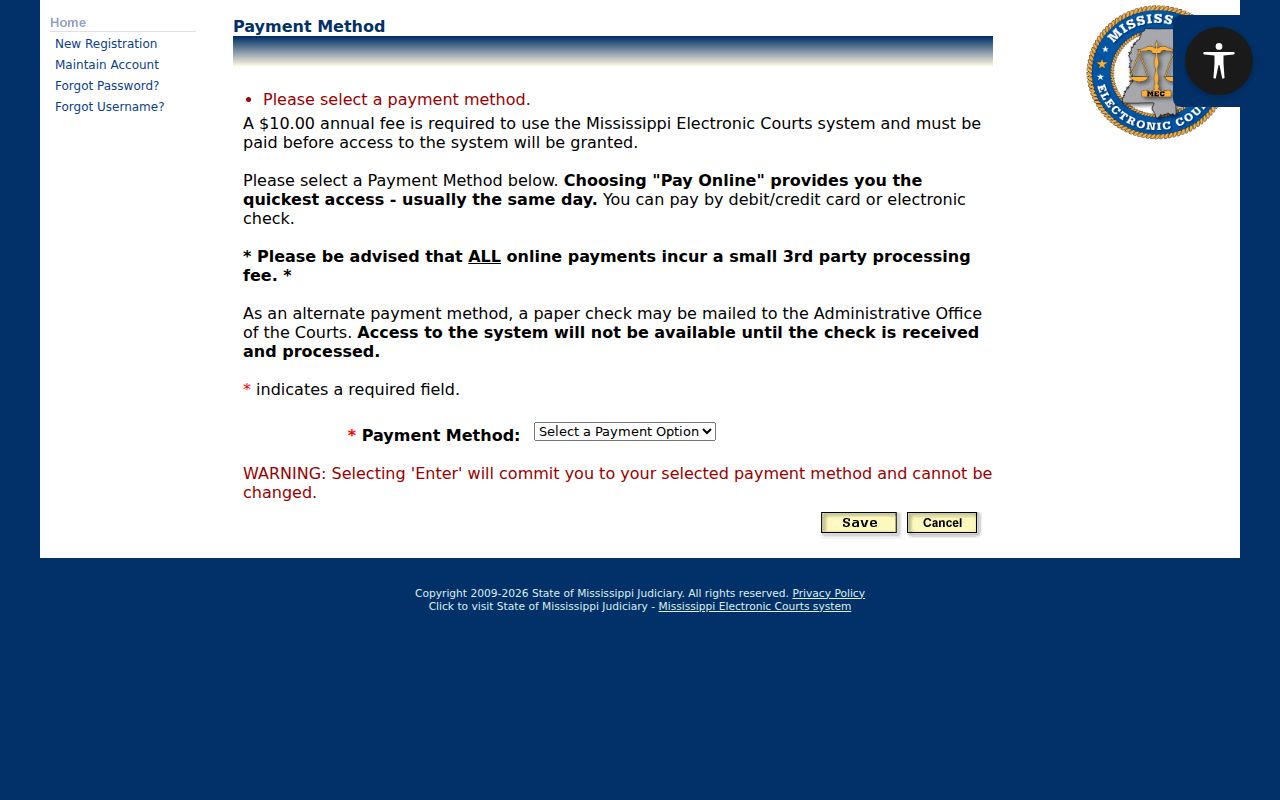
Payment only finishes account setup. A searcher still has to enter the correct participating court system and follow its access rules.
Jefferson Davis County No-Match Search Cost
A search with no match can still produce a billable PAMEC page. The official non-attorney terms impose a $0.20 per returned-page charge, including one page when a search finds nothing. That charge belongs to remote PAMEC access. It is not a Jefferson Davis County clerk copy fee. Before repeating a search, check the court route, the name spelling, and the account access. If the case may sit in Justice Court, a municipal court, or an older paper file, move to the responsible clerk. The electronic result alone is not conclusive.
Case Search Results Explained
Once a case opens lawfully, treat the docket as a chronological index rather than a certified file. Record the header, the dates, the case type, the dated entries, settings, disposition language, document availability, and any restriction notice. A visible flag tells only part of the story. A missing image does too.
| Header | Court, district, case number, case type, division, judge, filing or opening date, status, and flags. |
|---|---|
| Docket entries | Entry date, event or title, filer or actor role, short description, document link, page count, and status. |
| Settings | Hearing or trial type, date, time, location, judge, courtroom, and any reset indicator. |
| Disposition | Judgment, order, or disposition date and its docket language. A proposed order is different from an entered order. |
| Access | Seal or restriction flag, redaction notice, permission message, document availability, and last-updated indicator if shown. |
Read the header first. Then status and flags, then the entries from oldest to newest. Find the latest entered order before trusting an earlier setting.
Jefferson Davis County Case Search Court Types
Jefferson Davis County splits its cases across several courts. The county court page works best as a routing map. Start by matching the case type to the right court. Circuit Court takes general civil and criminal matters not sent elsewhere. Chancery covers family, estate, guardianship, land, title, and equity. Justice Court handles traffic, DUI, county-ordinance, and limited-civil cases, plus initial felony proceedings. Prentiss municipal matters go through the city court route. Youth Court records sit behind confidentiality rules.
Route before searching: A search that begins with the wrong court can produce no result even when a local case exists. Match the court to the notice, issuing agency, or subject before using MEC or asking a clerk to search.
Once the docket index points you to a case, the court's custodian handles anything deeper. For the exact document or a certified copy, the Jefferson Davis County court case records route is the practical next step.
Jefferson Davis County Justice Court Search Gap
Justice Court posts no public online case form, citation lookup, or calendar. The clerk is the county route for MHP and sheriff traffic tickets, DUIs, county ordinances, limited civil matters, and initial felony proceedings. The office sits at 2335 Columbia Avenue in Prentiss. The published telephone number is 601-792-5129. When you call, give the clerk a citation number. Also give the issuing agency, the court type, a name or style, and an approximate date. That direct approach beats trying to squeeze a Justice Court matter into the Circuit MEC query screen.
Two Ways to Search: County and State
Mississippi's electronic route is layered, not truly statewide. PAMEC can provide remote access to participating MEC systems. Even so, it is not a free statewide public index, and it does not guarantee access to Justice Court, municipal, Youth Court, sealed, or older paper records. Once you identify the docket type, the responsible clerk or court is the county route.
| MEC and PAMEC route | County clerk or court route |
|---|---|
| Participating Circuit or Chancery electronic cases. | Files held by the appropriate Circuit, Chancery, Justice, municipal, or Youth Court office. |
| Remote account access, with PAMEC fees and restrictions. | Phone, mail, written request, counter service, or public terminal as the office supports. |
| Useful when the case is in the correct MEC district. | Necessary when no online lower-court or municipal form was located. |
The Thirteenth Chancery MEC route is separate from Fifteenth Circuit MEC. A paid account will not merge the two district systems into one county search screen.
Jefferson Davis County Case Search Access Options
MEC procedures describe free electronic access at the clerk's office during regular business hours. PAMEC supplies the remote public side. Many practical questions stay open. The local sources do not say how many terminals exist, whether staff will run searches, whether every subscriber document appears at a terminal, or where the cutoff sits for printed or certified copies. So call the responsible office before you travel. Ask whether the docket lives in MEC, at a public terminal, in paper, or in an older archive. The official PAMEC login screen is the remote gateway once you register. That page confirms credentials come first for remote MEC access rather than a public name-search box.
Note: Confirm the address, counter, hours, and availability before travel. Jefferson Davis County court offices use separate locations, and a quick call can save a wasted trip.
Which Cases Stay Restricted
Jefferson Davis MEC uses access vocabulary such as RESTRICTED BY ORDER, SEALED, and Sealed_Case. A query can show a case shell while denying a document. It may display a redacted image or return a permission message. Keep the limits straight. A missing PDF does not prove a docket entry never existed. A case header does not make every filing public.
Youth Court records form the central local confidentiality category. Chancery matters involving minor children, adult wards, guardianship, or guardian ad litem activity can also carry limited access. A written request under the Mississippi Public Records Act cannot override a judicial seal. Nor can it override a Youth Court confidentiality statute. Ask the responsible custodian. Ask whether a public docket shell, an order, or a redacted non-exempt portion can be inspected.
Older Jefferson Davis County Case Files
A no-result from a current electronic route does not prove the record never existed. Circuit MEC went live in 2015. Chancery MEC followed in 2019. The local sources publish no digitization cutoff, microfilm year, destruction schedule, or older-case search fee. A file may still sit in paper, microfilm, archived storage, another court, or a restricted category.
A lawful result may appear. Write down the filing date. Note the latest docket activity, the current status, the latest setting, any document-availability notice, and the court that returned it. Those details separate an older result from a current setting. They also give the clerk enough to locate the underlying file or explain a restriction.
Give the clerk the court. Add the case number or style, an approximate date, and the specific docket or document you want. Ask whether the office can check MEC, paper, microfilm, archive storage, or an off-site series. Request the current copy or inspection process. That focused request works far better. It beats treating a web search as a complete county record inventory.